


1. Dashboard
  2. Mitglieder
    1. Letzte Aktivitäten
    2. Benutzer online
    3. Team
    4. Mitgliedersuche
  3. Filebase
  4. Forum
  5. Zebradem-WIKI
  6. Foren-Regeln
  7. Spenden Liste
    1. Spenden
  • Anmelden
  • Registrieren
  • Suche
ZebraDem-Sponsoring
Dieses Thema
  • Alles
  • Dieses Thema
  • Dieses Forum
  • Seiten
  • Dateien
  • Forum
  • Erweiterte Suche
  1. Forum
  2. Computer Ecke
  3. Software

Vista Manager.....! (Download inside!)

  • Gast
  • 20. März 2007 um 13:43
  • Gast
    Gast
    • 20. März 2007 um 13:43
    • #1

    [color="Yellow"]What is Vista Manager?[/color]

    Zitat

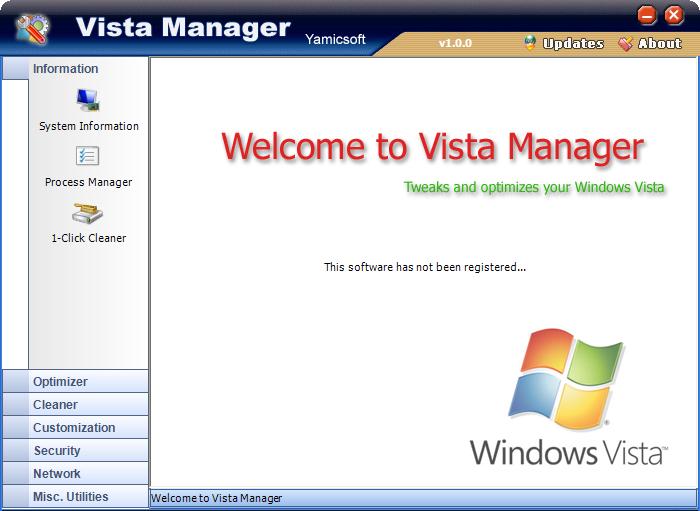
    Vista Manager is a system utility that helps you to optimize and tweak, clean up your Windows Vista. It will increase you system speed, improve system security and suit your idea!

    Why Should I use Vista Manager?

    Windows Vista is the new Operating System for home users and professionals alike. Windows Vista brings clarity to your world, so you can more safely and easily accomplish everyday tasks and instantly find what you want on your PC.

    Vista Manager is the powerful software tool to tweak and optimize your Windows Vista, it bundles more than 28 different utilities in one and help your system faster and more stable, secure and personal!
    Features and Benefits of Vista Manager

    * Information
    Get detailed system and all hardware information on your system; show all detailed information of running processes and threads on your machine; Vista Manager offers 1-clicking cleans your system automatically.

    * Optimizer
    Tweak your system to improve windows startup and shutdown speed; tweak your hardware to increase system speed and performance.

    * Cleaner
    Find out which files or folders engross your disk space and shown with chart; Find and clean junk files to increase Hard Disk space; Duplicate Files Finder can scan your computer for files with the same size, name and modification time; Registry Cleaner can easily checks your registry and repair incorrectly linked registry entries, automatically remove invalid entries; Registry Defrag rebuilds and re-indexs your registry to reduce application response time and registry access time.

    * Customization
    Control what is started on Windows startup; edit context menus of mouse Right-Clicking; customize system desktop, menus, toolbar and notifications settings; automatically change your desktop wallpaper on background.

    * Security
    You can improve desktop, menus, Windows logon securities, and enable numerous hidden performance options of system, disable system updates and error reports; hide and restrict to access drives, specify which applications are not allowed to be executed on your computer; encrypt/decrypt and shred files, change the location of system folders; Privacy Protector can maintain your personal privacy by eliminating the tracks that you leave behind; create lots of randomization password once.

    * Network
    Optimize your Internet connection speed, manage all shares items; tweak your Internet Explorer easily.

    * Misc. Utilities
    Show the collection of Windows utilities; help you find out the installation key of Windows, Office products; shutdown your PC or remind you automatically. (yamicsoft)
    Alles anzeigen

    Download ULC!

    [color="Yellow"]Bedankomat nicht vergessen![/color]

  • gonso-01
    Gast
    • 20. März 2007 um 14:46
    • #2

    Vista Boot Logo Generator

    Neues Boot-Logo: Für das neue Windows.Vista Boot Logo Generator
    Windows Vista kommt ohne Bootscreen aus - abgesehen vom grafisch weniger ansprechenden Ladebalken. Möchten Sie dennoch den Bootscreen verändern und farblich aufpeppen - das Gratis-Tool "Vista Boot Logo Generator" lädt jedes beliebige BMP-Bild mit 24-Bit wahlweise in den Auflösungen 1.024 x 768 oder 800 x 600 als Boot-Screen. Per Klick auf »Save Boot Screen File As« generiert die Freeware den Bootscreen, den Sie anschließend in den Ordner »%windir%\System32\de-DE« kopieren müssen.

    Damit Windows Vista den Bootscreen später auch anzeigt, muss noch eine Veränderung in der Systemkonfiguration vorgenommen werden. Starten Sie »msconfig« und setzen Sie im Menü »Start« ein Häkchen bei »Kein GUI-Start«.

    Klick zu Vista Boot Logo Generator


    Ein Danke wehre schön

Jetzt mitmachen!

Du hast noch kein Benutzerkonto auf unserer Seite? Registriere dich kostenlos und nimm an unserer Community teil!

Benutzerkonto erstellen Anmelden

Spenden

Vielen Dank für die Unterstützung!
Hiermit unterstützt du Zebradem.
Das beinhaltet überwiegend die Serverkosten und Lizenzgebühren.
Spenden

Letzte Beiträge

  1. Books3: Torrent-Aussage eines Ex-Meta-Forschers wirft Fragen zur Herkunft der KI-Trainingsdaten auf

    heugabel
    2. November 2026 um 19:27
  2. HiAnime: Sieben Angeklagte und 12,85 Millionen USDT aus dem Streaming-Geschäft

    heugabel
    1. November 2026 um 17:27
  3. mpv und mpv.net: Was der schlanke Mediaplayer bei Bild, Streaming und Untertiteln wirklich kann

    heugabel
    1. November 2026 um 09:28
  4. Illegales IPTV: Studie schätzt 3,9 Millionen Nutzer in Deutschland

    heugabel
    31. Oktober 2026 um 19:27
  5. PS5-Jailbreak: 50.000 Dollar für einen Hypervisor-Bug spalten die Szene

    heugabel
    28. Oktober 2026 um 21:27
  6. Falschgeld am Amtsgericht Hof: Ein falscher Fünfziger führt zu weiteren Funden

    heugabel
    27. Oktober 2026 um 19:28
  7. Die CD wächst wieder – doch die Umsätze erzählen nur die halbe Geschichte

    heugabel
    24. Oktober 2026 um 19:28
  8. House of Usenet ist zurück: Was die Testdomain über den Relaunch verrät

    heugabel
    23. Oktober 2026 um 20:29
  9. Telegram ohne Google-Push: So laufen Benachrichtigungen über die eigene Nextcloud

    heugabel
    22. Oktober 2026 um 17:30
  10. KI-Trainingsdaten: Meta muss die Verantwortlichen für Schattenbibliothek-Downloads benennen

    heugabel
    20. Oktober 2026 um 18:28
© 2026 Zebradem - Software by WoltLab